What iPad Do I Have: iPad Serial Number Lookup [Updated 2022]
When you want to buy an accessory or sell an old iPad, the first thing you want to know is the model number of your iPad. We often find ourselves stuck with the question, “What iPad do I have?” Knowing iPad serial numbers is essential for buying compatible accessories. With our list of all the iPads ever made, along with their generations and models, you will be able to identify your iPad regardless of when it was launched.
The iPad is a versatile device. You can use it for both work and leisure. And after you set up an iPad for work, be it corporate or production work, there is no going back to other devices. The utility is such that 70 percent of the professional world swears by it. Your iPad’s serial number is your iPad’s identity. And some of us are completely oblivious about our iPad model. But not for long.
Identifying which iPad you have is a rather easy task. It is written microscopically on the body itself and can also be found in the Settings of your iPad. The question, “What iPad do I have?” will be answered thoroughly.
What iPad Do I have? How to Find iPad Model Numbers?

Your iPad’s model number tells you what kind of iPad you own. To find the model number, you don’t even have to turn on your device; just look on the back of your iPad. Underneath the “iPad” engraving, you will see a very small print of your iPad model number. The number should start with the capital letter “A.”
If you don’t wanna stress your eyes reading the tiny print or if you are too lazy to take the cover off your device, you can use this method for iPad serial number lookup:
- Open Settings app
- Select General
- Tap About
- In the Model Number section, you will see your iPad’s SKU number, which ends with “A.” Don’t confuse it with your iPad model number. Tap on this section to get a shorter number that starts with “A.” The answer to your “What iPad do I have” has been answered.
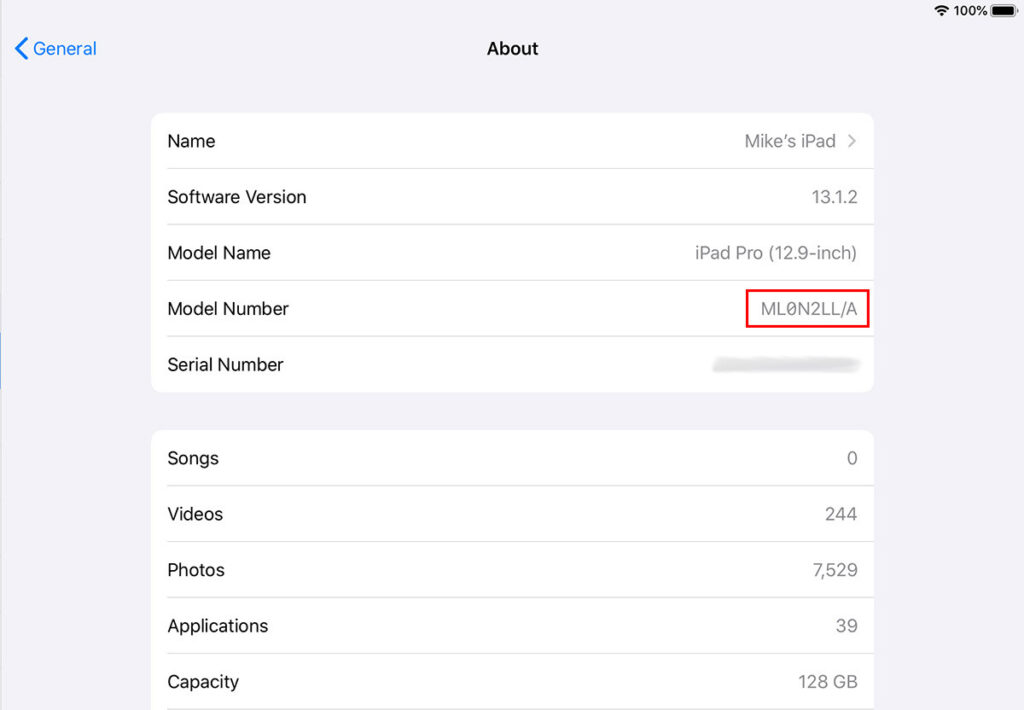
Now that you know your iPad’s model number, you can move forward to knowing what kind of iPad you have.
What Generation is My iPad? iPad Versions and iPad Model Numbers

If you are wondering, “What iPad do I have?” you also want to know what generation is your iPad. I have made charts of all the iPads launched to date and segregated them according to their generations. In these lists, you can look for your iPad’s model number and easily identify which version of the iPad you own.
iPad Generation and their Models
| iPad Generation | Model Number |
| 1st Generation | A1219, A1337 |
| 2nd Generation | A1395, A1396, A1397 |
| 3rd Generation | A1403, A1416, A1430 |
| 4th Generation | A1458, A1459, A1460 |
| 5th Generation | A1822, A1823 |
| 6th Generation | A1893, A1954 |
| 7th Generation | A2197, A2200, A2198 |
| 8th Generation | A2270, A2428, A2429, A2430 |
| 9th Generation | A2602, A2604, A2603, A2605 |
iPad Mini Generations and Their Model Numbers
| iPad mini Generations | Model Numbers |
| iPad mini 1 | A1432, A1454, A1455 |
| iPad mini 2 | A1489, A1490, A1491 |
| iPad mini 3 | A1599, A1600 |
| iPad mini 4 | A1538, A1550 |
| iPad mini 5 | A2133, A2124, A2126, A2125 |
| iPad mini 6 | A2567, A2568, A2569 |
iPad Air Generations and Their Model Numbers
| iPad Air Generations | Model Numbers |
| iPad Air 1 | A1474, A1475, A1476 |
| iPad Air 2 | A1566, A1567 |
| iPad Air 3 | A2152, A2123, A2153, A2154 |
| iPad Air 4 | A2316, A2324, A2325, A2072 |
| iPad Air 5 | A2588, A2589, A2591 |
iPad Pro Generations and Their Model Numbers
| iPad Pro Generations | Model Numbers |
| iPad Pro 12.9 inch 1st Generation | A1584, A1652 |
| iPad Pro 9.7 inch | A1673, A1674, A1675 |
| iPad Pro 10.5 inch | A1701, A1709 |
| iPad Pro 12.9 inch 2nd Generation | A1670, A1671 |
| iPad Pro 12.9 inch 3rd Generation | A1876, A2014, A1895, A1983 |
| iPad Pro 11 inch 1st Generation | A1980, A2013, A1934, A1979 |
| iPad Pro 11 inch 2nd Generation | A2228, A2068, A2230, A2231 |
| iPad Pro 12.9 inch 4th Generation | A2229, A2069, A2232, A2233 |
| iPad Pro 11 inch 3rd Generation | A2377, A2459, A2301, A2460 |
| iPad Pro 12.9 inch 5th Generation | A2378, A2461, A2379, A2462 |
What iPad Do I Have?
Wrapping Up
I hope you got enough information for your query; “What iPad do I have?” It is very important to remember that there are iPads of the same name but they can be of different generations. Once you know the model number and the generation, you can move ahead and buy the accessories for your new iPad. It is always recommended to stay up to date with the newest iPad if you are using it for work.
u003cstrongu003eHow to Find iPad Model Numbers?u003c/strongu003e
u003cstrongu003eSettings appu003c/strongu003e u003cstrongu003eu0026gt; General u0026gt; About u003c/strongu003eu003cbru003eu003cbru003eIn the u003cstrongu003eModel Number u003c/strongu003esection, you will see your iPad’s SKU number which ends with “A”. Don’t confuse it with your iPad model number. Tap on this section to get a shorter number that starts with “A”. You will get the iPad model number.u003cbru003e
u003cstrongu003eHow do I know exactly which iPad I have?u003c/strongu003e
All you have to do is go to u003cstrongu003eSettings u0026gt; General u0026gt; Aboutu003c/strongu003e. The model number is in the top section.u003cbru003e
u003cstrongu003eHow long should an iPad last?u003c/strongu003e
According to u003ca href=u0022https://www.lifewire.com/how-long-an-ipad-lasts-5323123u0022u003eLifewireu003c/au003e, five years is the standard lifespan of any iPad.