What Does Green Text Mean on iPhone? Does iMessage App Need Internet?
iMessage App is one of the most phenomenal apps out there in terms of technology. It has several advanced features like hiding alerts, sharing location, and sending a ton of AR emojis. In fact, iMessage is so advanced that it tells whether your contact has turned DND on. In addition to these features, there is confusion among iPhone users about What Does Green Text Mean on iPhone?
The iMessage app is so good at keeping and sorting texts that, as an Apple user, I would never want to leave it. And the best part is that Apple offers end-to-end encryption on your chats. So, when you initiate a conversation, all the messages or chat data will remain between you and the member of the group/contact.
In simple words, iMessage may seem like any other Messages app out there. But, in reality, it is a lot more than these basic messaging apps. If you also own an iPhone and wondering What Does Green Text Mean on iPhone? Then follow this article till the end for the answer.
What Does Green Text Mean on iPhone?
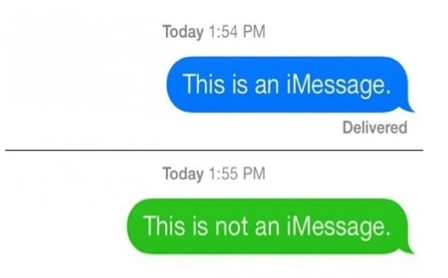
Green text on your iPhone means that you are trying to send a message through the iMessage app, but your contact is not on a version of iMessage or does not have an iPhone. Therefore, the message will be sent as a standard SMS, and end-to-end encryption will not be active. Some Apple users alleged that green text means you have been blocked, but that’s not at all true.
Why Should I Use iMessage?
The iMessage app has a lot of advanced features like hide alerts, sharing location, AR emojis, and more. In addition to that, it has end-to-end encryption, which guarantees that even Apple cannot read your messages.
How to Enable the iMessage App?
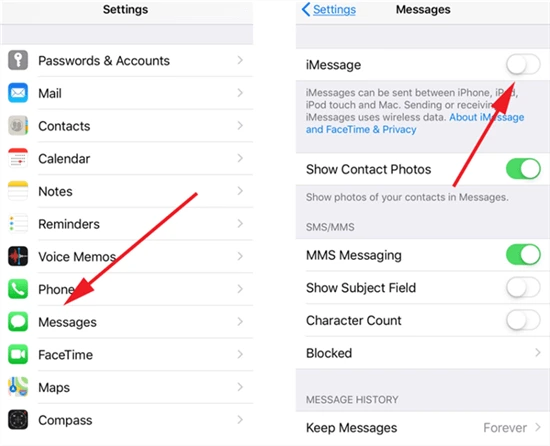
You can enable the iMessage app on your iPhone by following the simple steps given below:
Step 1: Unlock your iPhone and go to Settings.
Step 2: Scroll down until you see the Message option.
Step 3: Tap on iMessage to enable it by toggling the button towards the right or turning it green.
Is iMessage A Free App?
Yes, the iMessage is a free app for all Apple users. However, if you wish to buy emojis or look at paid stickers, you can pay and use them.
Does iMessage App Need the Internet?
Yes, to be able to use the iMessage app and access its features, you need to enable cellular data or connect your iPhone to Wi-Fi.
What Does Green Text Mean on Your iPhone?
Wrapping Up
This completes my article on What Does Green Text Mean on iPhone. I hope that this article was helpful for you in figuring out the meaning of green texts and the method to enable the iMessage app on your iPhone. If you have any questions, you may drop them in the comments section, and I will be happy to answer.
Frequently Asked Questions
u003cstrongu003eQ. What Does Green Text Mean on Your iPhone? u003c/strongu003e
u003cstrongu003eA.u003c/strongu003e Green text on your iPhone means that you are trying to send a message through the iMessage app, but your contact is not on a version of iMessage or does not have an iPhone. Therefore, the message will be sent as a standard SMS, and end-to-end encryption will not be active. Some Apple users alleged that green text means you have been blocked, but that’s not at all true.
u003cstrongu003eQ. Why Should I Use iMessage? u003c/strongu003e
u003cstrongu003eA.u003c/strongu003e The iMessage app has a lot of u003ca href=u0022https://pathofex.com/what-does-hide-alerts-mean/u0022 target=u0022_blanku0022 data-type=u0022URLu0022 data-id=u0022https://pathofex.com/what-does-hide-alerts-mean/u0022 rel=u0022noreferrer noopeneru0022u003eadvanced features like hiding alertsu003c/au003e, sharing location, AR emojis, and more. In addition to that, it has end-to-end encryption, which guarantees that even Apple cannot read your messages.
u003cstrongu003eQ. How to Enable The iMessage App? u003c/strongu003e
u003cstrongu003eA. u003c/strongu003eYou can enable the iMessage app on your iPhone by following the simple steps given below:u003cbru003eu003cstrongu003eStep 1: u003c/strongu003eUnlock your iPhone and go to u003cstrongu003eSettings.u003c/strongu003eu003cbru003eu003cstrongu003eStep 2: u003c/strongu003eScroll down until you see the u003cstrongu003eMessage u003c/strongu003eoption.u003cbru003eu003cstrongu003eStep 3: u003c/strongu003eTap on iMessage to enable it by toggling the button towards the right or turning it green.